Workers
Overview
The Workers page (Administration → Workers) shows the status of all task execution infrastructure for the tenant.
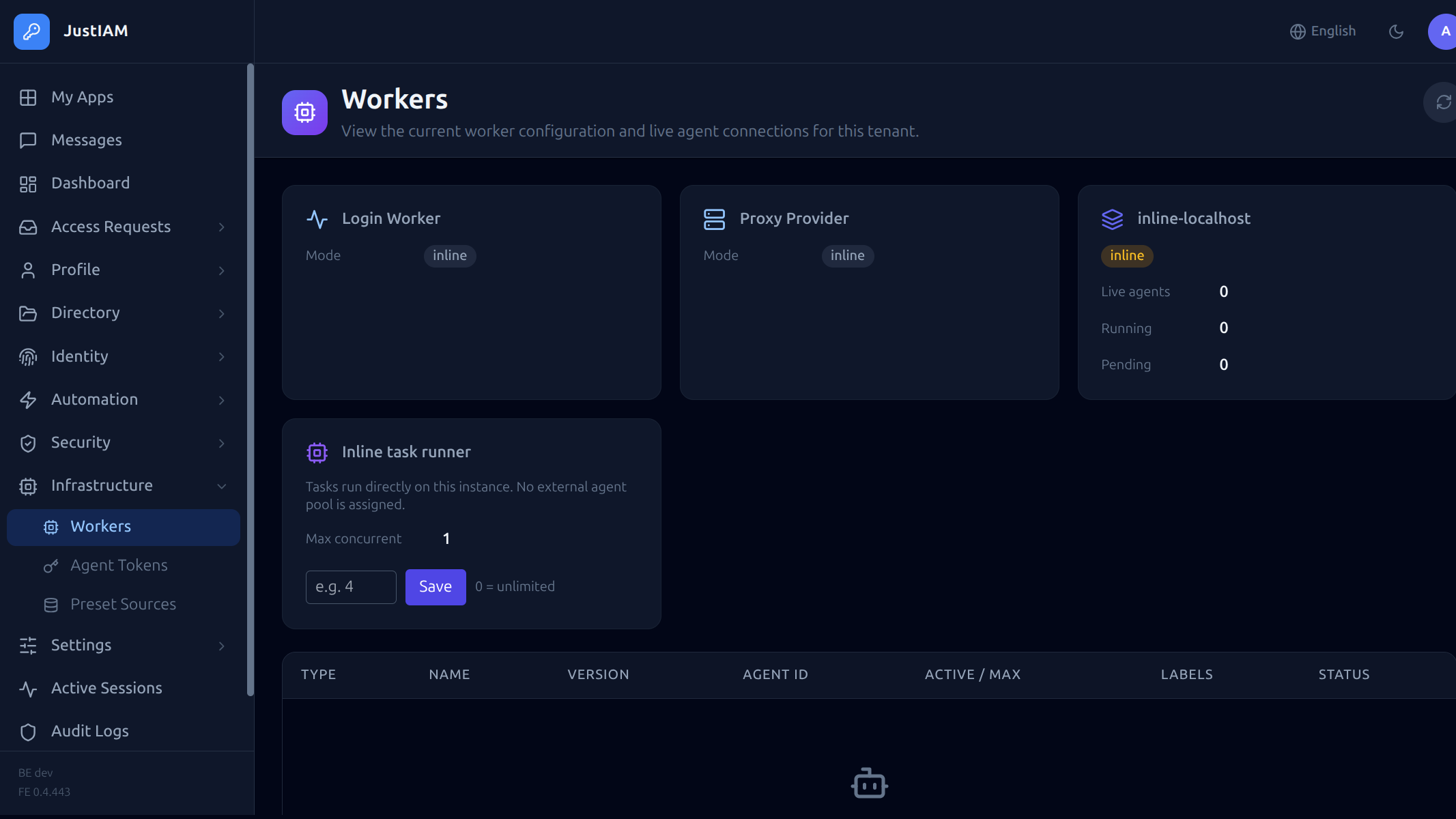 JustIAM supports two execution models for scheduled tasks:
- Inline execution — tasks run inside the backend process. No external infrastructure needed.
- Agent execution — tasks are dispatched to external gRPC agents running in dedicated pods.
Execution models
Inline (built-in)
When no external agent pool is configured, tasks run directly in the backend process using the built-in task runner. This is the default mode and requires no additional deployment.
Advantages:
- Zero additional infrastructure
- Simplest deployment model
- Suitable for small to medium workloads
Limitations:
- Tasks share CPU and memory with the API server
- No isolation between task execution and request handling
- Script execution (yaegi) happens in-process
Agent (external)
When agent pools are configured, tasks are dispatched to external agents over gRPC. Agents run as separate pods and can be scaled independently.
Advantages:
- Task execution is isolated from the API server
- Agents can be scaled horizontally
- Dedicated resources for heavy workloads
- Multiple pools with different capabilities
See External Agents for deployment details.
Concurrency control
Agent mode
When using agent pools, the concurrency cap is set by the control plane via the Task Max Concurrent setting on the tenant. This limits how many tasks can run simultaneously across all pools.
Inline mode
When using inline execution, concurrency is controlled by the task_inline_max_concurrent setting, configurable from the Workers page:
| Setting | Default | Description |
|---|---|---|
task_inline_max_concurrent |
0 |
Maximum concurrent tasks for the inline runner. 0 = unlimited |
Tip
Set a concurrency limit to prevent heavy task workloads from starving API requests when running in inline mode.
The concurrency cap is enforced using monotonic River job IDs — older jobs always proceed first, and newer jobs are snoozed (100ms delay) when the cap is reached.
Workers page details
The Workers page displays:
Status cards
| Card | Description |
|---|---|
| Login Worker Mode | How post-render scripts are executed during login: inline, shared, or dedicated |
| Login Worker Concurrency | Per-tenant cap on concurrent login script executions |
| Proxy Mode | Proxy provider execution mode |
| Backend Version | Version of the backend binary |
| Task Concurrency | Current inline or pool-based concurrency cap |
Connected agents
A table showing all currently connected agents:
| Column | Description |
|---|---|
| Agent ID | Unique identifier |
| Type | login-worker or pool agent |
| Active tasks | Number of tasks currently being executed |
| Connected since | Timestamp |
Pool status
For each River pool, the page shows:
| Column | Description |
|---|---|
| Pool name | Pool identifier |
| Live agents | Number of connected agents |
| Running | Tasks currently executing |
| Pending | Tasks waiting for an available agent |
Overlap policies
When a task is triggered while the same task is already running, the behavior depends on the overlap policy:
| Policy | Behavior |
|---|---|
queue |
New run waits until the current run finishes |
skip |
New run is dropped silently |
replace |
Current run is cancelled, new run starts |
Built-in tasks
JustIAM seeds the following maintenance tasks on startup:
| Task | Schedule | Timeout | Description |
|---|---|---|---|
saml_session_cleanup |
0 * * * * (hourly) |
60s | Removes expired SAML session records |
audit_log_cleanup |
0 3 * * * (daily) |
120s | Deletes audit entries older than the retention period |
trusted_device_expiry |
*/5 * * * * |
60s | Expires remembered device cookies |
user_message_delivery |
*/5 * * * * |
60s | Sends pending user message notifications |
access_request_expiry |
*/5 * * * * |
60s | Expires access grants past their TTL |
preset_cache_refresh |
0 */6 * * * |
120s | Refreshes the preset task catalog cache |
agent_token_cleanup |
0 4 * * * |
60s | Removes expired agent tokens |
These tasks run automatically. They can be viewed in the Scheduled Tasks page but should not be deleted.
API
Get worker status:
Response:
{
  "login_worker_mode": "inline",
  "login_worker_max_concurrent": 0,
  "proxy_mode": "",
  "tenant_version": "1.2.0",
  "task_max_concurrent": 0,
  "task_inline_max_concurrent": 5,
  "agents": [
    {
      "id": "agent-1",
      "type": "pool",
      "active_count": 2,
      "connected_at": "2024-01-15T10:30:00Z"
    }
  ],
  "pools": [
    {
      "pool": {
        "name": "default",
        "labels": ["compute"]
      },
      "live_agents": 3,
      "running_now": 2,
      "pending_now": 0
    }
  ]
}
Configuration
Single-tenant (docker-compose)
Inline execution is the default. Set the concurrency cap via the Workers page or API:
PUT /api/v1/settings
Content-Type: application/json

{
  "key": "task_inline_max_concurrent",
  "value": "10"
}
Multi-tenant (control plane)
Worker mode is configured per-tenant in the control plane:
- Inline — backend process handles everything
- Agent — external gRPC agents receive task dispatches
The control plane also manages:
- Agent pool creation and tenant assignment
- Shared agent pool scaling
- Login worker mode (inline / shared / dedicated)
See External Agents for agent deployment manifests.
Troubleshooting
| Symptom | Cause | Fix |
|---|---|---|
| Tasks stay in "pending" | No agents connected, or concurrency cap reached | Check agent connectivity; increase concurrency cap |
| Tasks run slowly | Inline mode under heavy API load | Switch to agent mode or set a lower concurrency cap |
| "No agents available" | All pool agents disconnected | Verify agent pods are running and gRPC port is reachable |
| High backend CPU | Inline yaegi script execution | Move to agent-based execution for compute-heavy scripts |