Scheduled Tasks
Overview
Scheduled Tasks allow JustIAM to run automated jobs on a cron schedule or as one-off operations. A set of built-in tasks is seeded on startup; custom tasks can also be created.
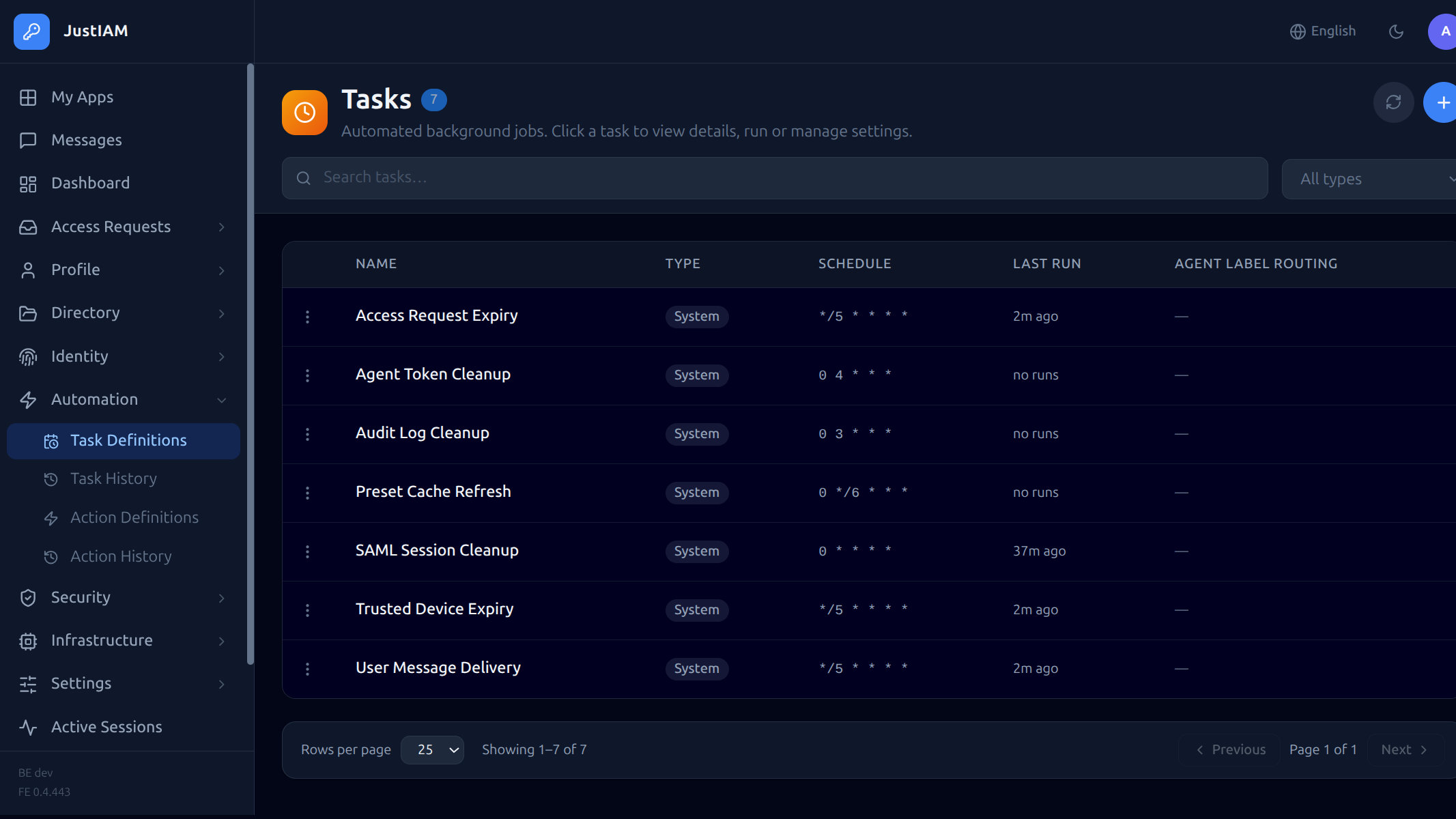
Built-in tasks
| Task type | Default schedule | Description |
|---|---|---|
saml_session_cleanup |
0 * * * * (hourly) |
Remove expired SAML sessions |
audit_log_cleanup |
0 3 * * * (daily at 03:00) |
Delete audit log entries older than the controlplane-configured retention (default 365 days) |
trusted_device_expiry |
*/5 * * * * (every 5 min) |
Remove expired trusted device records |
user_message_delivery |
*/5 * * * * (every 5 min) |
Deliver pending user messages |
access_request_expiry |
*/5 * * * * (every 5 min) |
Expire overdue access requests |
preset_cache_refresh |
0 */6 * * * (every 6 hours) |
Rebuild the preset (user-sync) definition cache |
agent_token_cleanup |
0 4 * * * (daily at 04:00) |
Delete agent tokens unused for more than 7 days |
Built-in tasks cannot be deleted or modified — any create, update, or delete attempt is rejected by the API with a 403 error.
Cron scheduling
When schedule_type is "cron", JustIAM automatically fires the task on the
cron_expr schedule without any manual action.
How it works
- At startup the backend computes the first
next_run_atfrom the cron expression and writes it to thetask_definitionsrow. - A background poller runs every 30 seconds. It uses
FOR UPDATE SKIP LOCKEDso only one backend replica claims each due task, even in multi-replica deployments. - On each poll the poller:
- Selects all enabled cron tasks where
next_run_at ≤ NOW(). - Advances
next_run_atto the next cron time in the same transaction. - Enqueues a River job for each due task outside the transaction.
- At startup the poller also heals any rows where
next_run_atisNULL(tasks created before this feature was available), so they begin firing without needing a manual edit.
Cron expression syntax
Standard 5-field cron: <minute> <hour> <day-of-month> <month> <day-of-week>
| Field | Range | Examples |
|---|---|---|
| minute | 0–59 | 0, */15, 0,30 |
| hour | 0–23 | *, 9-17 |
| day-of-month | 1–31 | *, 1 |
| month | 1–12 | *, 6-8 |
| day-of-week | 0–6 (Sun=0) | *, 1-5 |
* * * * *       every minute
0 * * * *       every hour on the hour
0 3 * * *       daily at 03:00
*/15 * * * *    every 15 minutes
0 9-17 * * 1-5  hourly during business hours, weekdays only
Disabling a cron task
Set enabled = false via the API or Terraform. The row's next_run_at is
preserved so re-enabling it (or setting a new cron_expr) immediately
recomputes the next fire time.
Overlap policy
The overlap_policy field controls what happens when a task is triggered while a run is already active.
| Value | Behaviour |
|---|---|
allow (default) |
New run starts immediately — concurrent runs allowed |
skip |
New trigger is dropped; a cancelled history entry is recorded with the reason |
queue |
New trigger is queued and runs in FIFO order after the active run finishes |
replace |
Active run is cancelled and a new run starts immediately; cancelled run appears in history |
Set via the API:
POST /api/v1/tasks
Content-Type: application/json

{
  "name": "My Script",
  "task_type": "script",
  "schedule_type": "cron",
  "cron_expr": "0 * * * *",
  "overlap_policy": "queue",
  "script": "..."
}
Set via Terraform:
resource "justiam_scheduled_task" "my_task" {
  name           = "My Task"
  task_type      = "script"
  schedule_type  = "cron"
  cron_expr      = "0 * * * *"
  overlap_policy = "queue"
  script         = "..."
}
Task types
saml_session_cleanup
No configuration required. Removes SAML sessions whose expires_at is in the past.
audit_log_cleanup
No configuration required. Retention is set by the platform operator via the controlplane Security limits section (default 365 days).
agent_token_cleanup
No configuration required. Deletes agent tokens (non-revoked) whose last used timestamp — or creation time if never used — is older than 7 days.
script
Runs arbitrary Go code via the Yaegi interpreter. The script must declare package task and export exactly:
The returned string is stored as the run output. A non-nil error marks the run as error status. Execution is capped at 30 seconds.
Full Go standard library is available. Example:
package task

import (
    "fmt"
    "time"
)

func Run() (string, error) {
    return fmt.Sprintf("ran at %s", time.Now().UTC().Format(time.RFC3339)), nil
}
Create via API:
POST /api/v1/tasks
Content-Type: application/json

{
  "name": "My Script",
  "task_type": "script",
  "schedule_type": "cron",
  "cron_expr": "0 * * * *",
  "config": {},
  "script": "package task\n\nimport \"fmt\"\n\nfunc Run() (string, error) {\n\treturn fmt.Sprintf(\"hello\"), nil\n}"
}
Create via Terraform:
resource "justiam_scheduled_task" "hello" {
  name          = "Hello Script"
  task_type     = "script"
  schedule_type = "cron"
  cron_expr     = "0 * * * *"
  script        = <<-EOT
    package task

    import "fmt"

    func Run() (string, error) {
        return fmt.Sprintf("hello from terraform"), nil
    }
  EOT
}
Task secrets
Script tasks can access encrypted key-value secrets at runtime via the injected
secrets package. Values are encrypted with AES-256-GCM (key derived from
JWT_SECRET) and are never returned by any API endpoint — only the key names
are readable.
Using secrets in a script:
package task

import (
    "fmt"
    "secrets"
)

func Run() (string, error) {
    apiKey := secrets.Get("API_KEY")
    if apiKey == "" {
        return "", fmt.Errorf("API_KEY secret not set")
    }
    // use apiKey ...
    return fmt.Sprintf("key length: %d", len(apiKey)), nil
}
secrets.Get("KEY") returns the decrypted value or an empty string if the key
does not exist.
Manage secrets via API:
# List secret key names (values never returned)
GET /api/v1/tasks/{id}/secrets
Authorization: Bearer <admin-token>

# Response
{"keys": ["API_KEY", "DB_PASSWORD"]}
# Replace all secrets (full PUT semantics — omitted keys are deleted)
PUT /api/v1/tasks/{id}/secrets
Authorization: Bearer <admin-token>
Content-Type: application/json

{
  "API_KEY": "my-secret-api-key",
  "DB_PASSWORD": "hunter2"
}
Manage secrets via Terraform:
resource "justiam_scheduled_task" "fetch_data" {
  name          = "Fetch External Data"
  task_type     = "script"
  schedule_type = "cron"
  cron_expr     = "0 6 * * *"

  script = <<-EOT
    package task

    import (
        "fmt"
        "secrets"
    )

    func Run() (string, error) {
        token := secrets.Get("BEARER_TOKEN")
        return fmt.Sprintf("token length: %d", len(token)), nil
    }
  EOT

  secrets = {
    BEARER_TOKEN = "my-long-lived-token"
  }
}
Note: The
secretsTerraform attribute is markedsensitive— Terraform will not display the values in plan output. Because the API never returns secret values, Terraform stores them only in local state (encrypted at rest by Terraform's state backend).
Injected packages for scripts
Beyond the Go standard library and secrets, scripts have access to four
additional host-injected packages.
config — task configuration
Read values from the task's dedicated config key-value store. Config entries are
managed (and visible) via the UI, API (GET/PUT /tasks/:id/config), or Terraform
task_config attribute. Values are stored in plain text.
import "config"

domain   := config.Get("domain")        // string value, "" if absent
groupIDs := config.GetList("group_ids") // []string; parses JSON array or comma-separated string
active   := config.GetBool("active")    // bool; true for "true", "1", "yes"
retries  := config.GetInt("retries")    // int; 0 if absent or non-numeric
Manage config via API:
# Read all config entries (key + value)
GET /api/v1/tasks/{id}/config
Authorization: Bearer <admin-token>

# Response
{"config": {"domain": "example.com", "group_ids": "["g1","g2"]"}}
# Replace all config entries (full PUT — omitted keys are deleted)
PUT /api/v1/tasks/{id}/config
Authorization: Bearer <admin-token>
Content-Type: application/json

{
  "domain": "example.com",
  "group_ids": "["g1","g2"]"
}
Manage config via Terraform:
resource "justiam_scheduled_task" "sync" {
  # ...
  task_config = {
    domain      = "example.com"
    provider_id = "<uuid>"
    user_state  = "active"
    group_ids   = jsonencode(["<group-uuid>"])
  }
}
idp — JustIAM user/identity operations
Create and manage users, assign groups, and link federated identities:
import "idp"

// Look up or create a user
u, err := idp.GetUserByEmail("alice@example.com")
u, err := idp.CreateUser("alice@example.com", "Alice", "Smith", "google")

// Edit a user
err = idp.UpdateUserActive(u.ID, false)  // deactivate

// Group membership (look up by name, then add)
g, err := idp.GetGroupByName("my-group")
err  = idp.AddUserToGroup(u.ID, g.ID)

// Federated identities
p, err  := idp.GetFederatedProvider(providerID)
existing, err := idp.GetFederatedUserBySub(providerID, googleSub)
err = idp.LinkFederatedIdentity(u.ID, providerID, googleSub)
idp.User has fields: ID, Email, FirstName, LastName, IsActive.
idp.Provider has fields: ID, Name, ProviderType.
idp.Group has fields: ID, Name.
Access request helpers
// Get the list of notified approvers for a given access request
approvers, err := idp.GetAccessRequestApprovers(requestID)
for _, a := range approvers {
    // a.ID, a.Email, a.FirstName, a.LastName
}
gworkspace — Google Workspace Admin SDK
List all active users in a Google Workspace domain using a service account:
import "gworkspace"

users, err := gworkspace.ListUsers(serviceAccountKey, "example.com")
for _, u := range users {
    // u.Sub, u.Email, u.FirstName, u.LastName
}
serviceAccountKey is the raw JSON content of the Google service account key
file. Store it as a task secret (secrets.Get("SERVICE_ACCOUNT_KEY")) to avoid
embedding sensitive credentials in the script or config.
fetch — OTel-instrumented HTTP client
Make outbound HTTP requests with automatic OpenTelemetry tracing. Each call
creates a child span (visible in Grafana/Tempo under the agent/script parent)
and injects traceparent/tracestate propagation headers so downstream
services join the same trace. Use fetch instead of net/http whenever you
want HTTP calls to appear in traces.
import "fetch"

// GET request
resp, err := fetch.Get("https://api.example.com/items")

// POST with a JSON body
resp, err := fetch.Post("https://api.example.com/items", "application/json", body)

// Full control: arbitrary method, body, and headers
resp, err := fetch.Do("DELETE", "https://api.example.com/items/42", "",
    map[string]string{"Authorization": "Bearer " + secrets.Get("API_TOKEN")})

// Response fields
resp.StatusCode  // int
resp.Body        // string (full response body)
resp.Headers     // map[string]string (response headers)
Note:
fetch.Doreturns an error only when the request itself fails (network error, DNS failure, etc.). HTTP 4xx/5xx status codes are surfaced viaresp.StatusCode— check them explicitly.
Reference scripts
The following reference implementations show common Google Workspace patterns
as script tasks, giving you full visibility and control over the logic.
google_import_user as a script
Store config as key-value entries via task_config.
resource "justiam_scheduled_task" "import_google_users" {
  name          = "Import Google Users"
  task_type     = "script"
  schedule_type = "once"

  task_config = {
    emails     = jsonencode(["alice@gmail.com", "bob@gmail.com"])
    user_state = "active"
    groups     = jsonencode(["google-users", "employees"])
  }

  script = <<-EOT
    package task

    import (
        "config"
        "fmt"
        "idp"
        "strings"
    )

    func Run() (string, error) {
        emails    := config.GetList("emails")
        userState := config.Get("user_state")
        groupNames := config.GetList("groups")
        activate  := userState != "inactive"

        var created, skipped, failed int
        var details []string

        for _, email := range emails {
            email = strings.TrimSpace(email)
            if email == "" {
                continue
            }
            if existing, _ := idp.GetUserByEmail(email); existing != nil {
                skipped++
                details = append(details, fmt.Sprintf("skip %s (already exists)", email))
                continue
            }
            u, err := idp.CreateUser(email, "", "", "")
            if err != nil {
                failed++
                details = append(details, fmt.Sprintf("fail %s: %v", email, err))
                continue
            }
            if !activate {
                _ = idp.UpdateUserActive(u.ID, false)
            }
            for _, gname := range groupNames {
                g, err := idp.GetGroupByName(gname)
                if err != nil {
                    details = append(details, fmt.Sprintf("group %q not found: %v", gname, err))
                    continue
                }
                _ = idp.AddUserToGroup(u.ID, g.ID)
            }
            created++
            details = append(details, fmt.Sprintf("created %s", email))
        }

        summary := fmt.Sprintf("%d created, %d skipped, %d failed", created, skipped, failed)
        if len(details) > 0 {
            summary += "\n" + strings.Join(details, "\n")
        }
        return summary, nil
    }
  EOT
}
google_workspace_sync as a script
Store the service account key as a secret; all other config goes in task_config.
resource "justiam_scheduled_task" "gworkspace_sync" {
  name          = "Google Workspace Sync"
  task_type     = "script"
  schedule_type = "cron"
  cron_expr     = "0 3 * * *"

  task_config = {
    domain          = "example.com"
    provider_id     = "<federated-provider-uuid>"
    user_state      = "active"
    groups          = jsonencode(["google-users", "employees"])
    excluded_emails = jsonencode(["svc@example.com"])
  }

  secrets = {
    SERVICE_ACCOUNT_KEY = file("service-account.json")
  }

  script = <<-EOT
    package task

    import (
        "config"
        "fmt"
        "gworkspace"
        "idp"
        "secrets"
        "strings"
    )

    func Run() (string, error) {
        serviceAccountKey := secrets.Get("SERVICE_ACCOUNT_KEY")
        if serviceAccountKey == "" {
            return "", fmt.Errorf("SERVICE_ACCOUNT_KEY secret is required")
        }

        domain      := config.Get("domain")
        providerID  := config.Get("provider_id")
        userState   := config.Get("user_state")
        groupNames  := config.GetList("groups")
        excluded    := config.GetList("excluded_emails")
        activate    := userState != "inactive"

        excludedSet := map[string]struct{}{}
        for _, e := range excluded {
            excludedSet[strings.ToLower(strings.TrimSpace(e))] = struct{}{}
        }

        provider, err := idp.GetFederatedProvider(providerID)
        if err != nil {
            return "", fmt.Errorf("provider not found: %v", err)
        }
        if provider.ProviderType != "google" {
            return fmt.Sprintf("provider type %q does not support directory sync", provider.ProviderType), nil
        }

        users, err := gworkspace.ListUsers(serviceAccountKey, domain)
        if err != nil {
            return "", fmt.Errorf("google directory API: %v", err)
        }

        var created, linked, skipped, excludedCount int
        var errs []string

        for _, gu := range users {
            if gu.Email == "" {
                continue
            }
            if _, ok := excludedSet[strings.ToLower(gu.Email)]; ok {
                excludedCount++
                continue
            }
            if synced, _ := idp.GetFederatedUserBySub(providerID, gu.Sub); synced != nil {
                skipped++
                continue
            }
            if existing, _ := idp.GetUserByEmail(gu.Email); existing != nil {
                if err := idp.LinkFederatedIdentity(existing.ID, providerID, gu.Sub); err != nil {
                    errs = append(errs, fmt.Sprintf("link %s: %v", gu.Email, err))
                    continue
                }
                for _, gname := range groupNames {
                    if g, err := idp.GetGroupByName(gname); err == nil {
                        _ = idp.AddUserToGroup(existing.ID, g.ID)
                    }
                }
                linked++
                continue
            }
            u, err := idp.CreateUser(gu.Email, gu.FirstName, gu.LastName, provider.Name)
            if err != nil {
                errs = append(errs, fmt.Sprintf("create %s: %v", gu.Email, err))
                continue
            }
            if !activate {
                _ = idp.UpdateUserActive(u.ID, false)
            }
            if err := idp.LinkFederatedIdentity(u.ID, providerID, gu.Sub); err != nil {
                errs = append(errs, fmt.Sprintf("link new %s: %v", gu.Email, err))
            }
            for _, gname := range groupNames {
                if g, err := idp.GetGroupByName(gname); err == nil {
                    _ = idp.AddUserToGroup(u.ID, g.ID)
                }
            }
            created++
        }

        summary := fmt.Sprintf(
            "sync %q: %d created, %d linked, %d skipped, %d excluded",
            domain, created, linked, skipped, excludedCount,
        )
        if len(errs) > 0 {
            summary += fmt.Sprintf("\nerrors (%d): %s", len(errs), strings.Join(errs, "; "))
        }
        return summary, nil
    }
  EOT
}
Creating a task
POST /api/v1/tasks
Authorization: Bearer <admin-token>
Content-Type: application/json

{
  "task_type": "audit_log_cleanup",
  "schedule_type": "cron",
  "cron_expr": "0 2 * * *",
  "config": {}
}
For a one-time task, use "schedule_type": "once" (no cron_expr needed).
Triggering immediately
Viewing run history
Per-task run history
Query parameters: page (default: 1), limit (default: 50).
Returns a paginated list of runs for a single task with status, start/end times, and output.
Cross-task run history (admin)
Query parameters:
| Parameter | Type | Description |
|---|---|---|
page |
integer | Page number (default: 1) |
limit |
integer | Page size (default: 50) |
task_id |
string | Filter by task UUID |
status |
string | Filter by status (success, error, running) |
Returns a paginated response (data, total, page, limit) of runs across all tasks.
Managing tasks
| Action | API |
|---|---|
| List tasks | GET /api/v1/tasks |
| Get task | GET /api/v1/tasks/{id} |
| Update (schedule, config) | PUT /api/v1/tasks/{id} |
| Delete (custom only) | DELETE /api/v1/tasks/{id} |
Editing built-in (system) tasks
Built-in tasks (saml_session_cleanup, audit_log_cleanup, trusted_device_expiry, user_message_delivery, access_request_expiry, preset_cache_refresh, agent_token_cleanup) are read-only — no fields can be changed via the API. Any PUT /api/v1/tasks/{id} request targeting a system task is rejected:
More examples
See Script Examples for ready-to-use task scripts:
- GitHub team sync — full team/member sync via GitHub App JWT auth
- Deactivate inactive users — auto-deactivate users who haven't logged in within N days
- Export user report — weekly compliance report to a webhook
- Rotate app secrets — auto-rotate OIDC client secrets and notify a vault
- LDAP user sync — sync users from LDAP/AD into JustIAM