Settings
Settings are stored in the database and can be changed at runtime from Administration → Settings without restarting the server. Some values (rate limits) refresh automatically every 30 seconds.
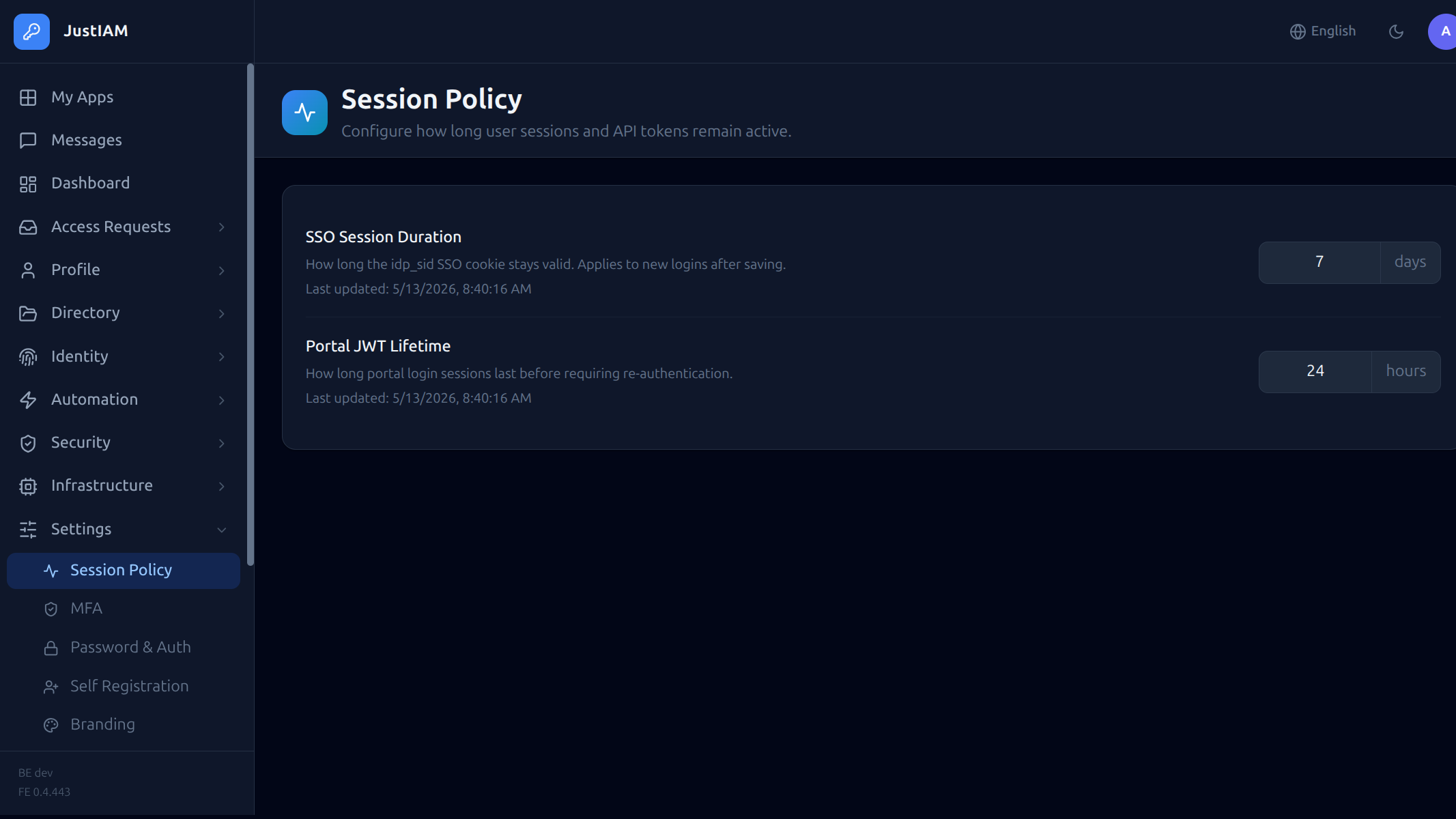
Session & Token
| Key | Default | Description |
|---|---|---|
session_duration_days |
7 |
Lifetime of the SSO idp_sid cookie in days |
token_duration_hours |
24 |
Lifetime of the portal JWT in hours |
oauth_refresh_ttl_days |
30 |
Lifetime of OAuth2 refresh tokens in days |
MFA
| Key | Default | Description |
|---|---|---|
mfa_policy |
disabled |
Global MFA policy: disabled, any, otp, passkey |
mfa_allowed_methods |
totp,passkey |
Comma-separated list of allowed enrollment methods |
mfa_enforce_enrollment |
false |
Block all logins until at least one MFA method is enrolled |
mfa_reauth_interval_minutes |
0 |
MFA re-verification interval in minutes. 0 = once per session (re-verify only at next login); > 0 = re-prompt after N minutes even within a valid session |
Password policy
| Key | Default | Description |
|---|---|---|
password_min_length |
8 |
Minimum password length |
password_require_uppercase |
false |
Require at least one uppercase letter |
password_require_number |
false |
Require at least one digit |
password_require_special |
false |
Require at least one special character |
bcrypt_cost |
10 |
bcrypt work factor for password hashing (4–31). OWASP minimum is 10. Lower values reduce CPU at the cost of weaker hashing — only change for non-production tenants |
The current password policy is readable by any authenticated user at GET /api/v1/me/password-policy, enabling the frontend to show live validation feedback.
Login & lockout
| Key | Default | Description |
|---|---|---|
allow_local_login |
true |
Allow email/password login. Set to false to force SSO-only |
allow_forgot_password |
true |
Show the "Forgot password?" link on the login page. Set to false to disable self-service password recovery |
allow_email_otp |
false |
Allow users to sign in with a one-time code or magic link sent to their email. Requires SMTP to be configured. See Email OTP / Magic Link |
allow_password_login |
true |
Allow users to sign in with their email and password. Set to false to require passwordless authentication (OTP / magic-link) only |
login_max_attempts |
10 |
Number of consecutive failed logins before the account is locked. 0 disables lockout |
login_lockout_minutes |
15 |
Base lockout duration in minutes. With login_lockout_multiplier > 1 this is multiplied for each successive lockout |
login_lockout_multiplier |
1 |
Incremental back-off multiplier. 1 = flat (always login_lockout_minutes). 2 = doubles each lockout (e.g. 15 m → 30 m → 1 h → 2 h). Max 4 |
Rate limiting
Login-path rate limiting is configured per-tenant by the platform operator via the controlplane. Tenant admins cannot change these values.
| Parameter | Default | Description |
|---|---|---|
rate_limit_max |
1000 |
Max login/auth attempts per IP per window. Set via controlplane Security limits. |
rate_limit_window_secs |
60 |
Rate limit window in seconds. Set via controlplane Security limits. |
Outbound HTTP allowlist (SSRF)
JustIAM blocks outbound HTTP from scripts, webhooks, federation discovery, OIDC backchannel logout, SAML metadata, the preset catalog and the geo-IP lookup from reaching private network ranges (RFC1918, loopback, link-local, IPv6 ULA, cloud metadata at 169.254.169.254, CGN). This is the application-level half of the SSRF mitigation; pair it with a NetworkPolicy egress rule for defense-in-depth.
Allowlists are configured by the platform operator via the controlplane Security limits section and cannot be changed by tenant admins:
| Parameter | Default | Description |
|---|---|---|
safehttp_allowed_hosts |
(empty) | Comma-separated hostnames whose resolved IPs bypass the SSRF block list. Match is exact and case-insensitive — wildcards are not supported. |
safehttp_allowed_cidrs |
(empty) | Comma-separated CIDR blocks whose IPs bypass the SSRF block list. Prefer the host list when the upstream has a stable name. |
Warning
Any host or CIDR listed here can be reached from a Yaegi script or webhook. Only allowlist services you intentionally want scripts/webhooks/integrations to reach.
Changes take effect on the next hot-reload (triggered automatically when the controlplane updates the tenant config).
Branding
| Key | Default | Description |
|---|---|---|
login_title |
JustIAM |
Title shown on the login page |
login_background_url |
(empty) | URL of the login page background image |
login_icon_url |
(empty) | URL of the icon shown on the login page |
Branding settings are served publicly at GET /api/v1/public/branding so the login page can render before authentication.
User Theming
Individual user appearance preferences (light/dark/custom themes) are stored per-user via the Preferences API, not in admin settings.
Self Registration
| Key | Default | Description |
|---|---|---|
self_registration_enabled |
false |
Show a "Create account" link on the login page so visitors can self-register |
self_registration_auto_activate |
false |
Activate accounts immediately after email verification. When false, an admin must activate the account manually |
self_registration_allowed_domains |
(empty) | CSV of permitted email domains (e.g. example.com,company.org). Empty = all domains accepted |
self_registration_allowed_emails |
(empty) | CSV of specific permitted email addresses. Additive with allowed_domains |
self_registration_require_captcha |
false |
Require hCaptcha on the registration form |
self_registration_captcha_secret |
(empty) | hCaptcha secret key (server-side). Required when captcha is enabled |
self_registration_captcha_site_key |
(empty) | hCaptcha site key (browser-side). Required when captcha is enabled |
Note
Self-registration requires SMTP to be configured so verification emails can be sent.
When both allowed_domains and allowed_emails are empty, any email address is accepted.
OTP-only or magic-link tenants
When allow_password_login is set to false:
- The registration form hides the password fields and no password is required. Created accounts cannot authenticate via password; users sign in with a one-time code or magic link instead.
- The Change Password option is hidden from user profile pages.
SMTP
| Key | Default | Description |
|---|---|---|
smtp_host |
(empty) | SMTP server hostname. Empty = email disabled |
smtp_port |
587 |
SMTP port |
smtp_username |
(empty) | SMTP authentication username |
smtp_password |
(empty) | SMTP authentication password |
smtp_from |
(empty) | From: address for outgoing emails |
Use Settings → Test Email to verify SMTP connectivity.
Audit log
Audit log retention is configured by the platform operator via the controlplane Security limits section.
| Parameter | Default | Description |
|---|---|---|
audit_log_retention_days |
365 |
Days to retain audit log entries. 0 = use platform default (365 days). |
Cleanup is performed by the built-in audit_log_cleanup scheduled task.
Preset Sources
Preset Sources has moved to Infrastructure → Preset Sources and is no longer part of the Settings page. Users with the preset_sources.manage permission (granted to Super Admin by default) can manage custom GitHub catalog repositories from that section.
See Preset Tasks — Custom sources for configuration details including GitHub App credentials.
Inline task runner
When a tenant runs tasks using the inline runner (no external agent pool assigned), you can cap the number of tasks that execute concurrently. This is configured from the Workers page inside JustIAM — not from the control plane.
| Key | Default | Description |
|---|---|---|
task_inline_max_concurrent |
0 |
Maximum tasks that can run in parallel on the inline runner. 0 = unlimited. |
This setting has no effect when an external agent pool is assigned to the tenant; in that case the per-pool capacity is managed from the control plane.